





To share a saved collection on Instagram, make it collaborative when you create it. Save a post, choose New collection, name it, turn on Collaborative, and pick the friend or group you want. Once you tap Save, the collection shows up in that chat and in Profile > Saved.
Already have a private collection you want to share? Your options are different, and they're covered in sharing a collection you already saved.
Shared collection not showing up? Start with these four quick checks. If it shows up but your friends see the wrong people or no new posts, our guide to collaborative collection limits and fixes walks through those.
How to share a new collection on Instagram
You set the sharing up while you create the collection, not after:
- Open the post or Reel you want to save, then use the bookmark control to open your collections. Depending on your app version, Instagram may show them after a tap or a press and hold.
- Choose New collection.
- Name the collection, turn on Collaborative, and select the friend or group you want to share it with.
- Tap Save. Instagram adds the collection to that chat, and everyone in it can add or remove posts.
If you skip the Collaborative toggle, Instagram saves a private collection instead, and there is no way to switch that one to collaborative later.
Start a collaborative collection from a chat
You can also begin inside a conversation:
- Send a post to the friend or group you want to share with.
- In that chat, tap the save icon next to the post.
- Pick a collaborative collection already shared with the chat, or choose New collection to start one.
This is the faster route when the chat already has the exact people you want in the collection.
Where a shared collection shows up
A collaborative collection appears in Profile > Saved, next to your private collections, and in the details of the chat it belongs to. When someone adds a post, Instagram drops a note into that chat.
Instagram's Help Center says collaborative collections are not available on computers. If a collection shows on your phone but not in a desktop browser, that is the Instagram limitation, not a missing collection.
Shared collection not showing up? Check these four things
- Look in the chat first. A collaborative collection lives in the chat it was created with. Open that conversation's details and it should be there, alongside Profile > Saved.
- You are on a computer. Collaborative collections do not appear on desktop at all, per Instagram's Help Center above. Check from the phone app.
- The Collaborative toggle never went on. If the collection was created without it, Instagram saved it as private, and nobody else can see it. There is no way to flip it afterward; rebuild it as a new collaborative collection, or import it and share a link instead.
- Your app is out of date. Collections features roll out unevenly across app versions. Update Instagram, close it fully, and check again.
If the collection shows for you but your friends see nobody in it, the wrong people, or no updates, that is a different set of problems. The fixes live in our guide to Instagram collaborative collection limits and fixes.
Can you share a collection you already saved?
Not as-is. As of August 2026, Instagram shows no Share control on an existing private collection, no way to add collaborators after the fact, and no public link. That leaves two practical paths:
- Rebuild it inside Instagram. Create a new collaborative collection, then add the old posts to it one at a time. The posts stay in Instagram, but the rebuild is fully manual.
- Import it somewhere you can share with a link. For a big collection, a browser extension can bring it over in one pass instead of making you re-save every post.
If your real problem is a collaborative collection that is missing or acting up, rather than a private one you want to share, the fixes live in the separate guide to Instagram collaborative collection limits and fixes.
Import a collection instead of rebuilding it
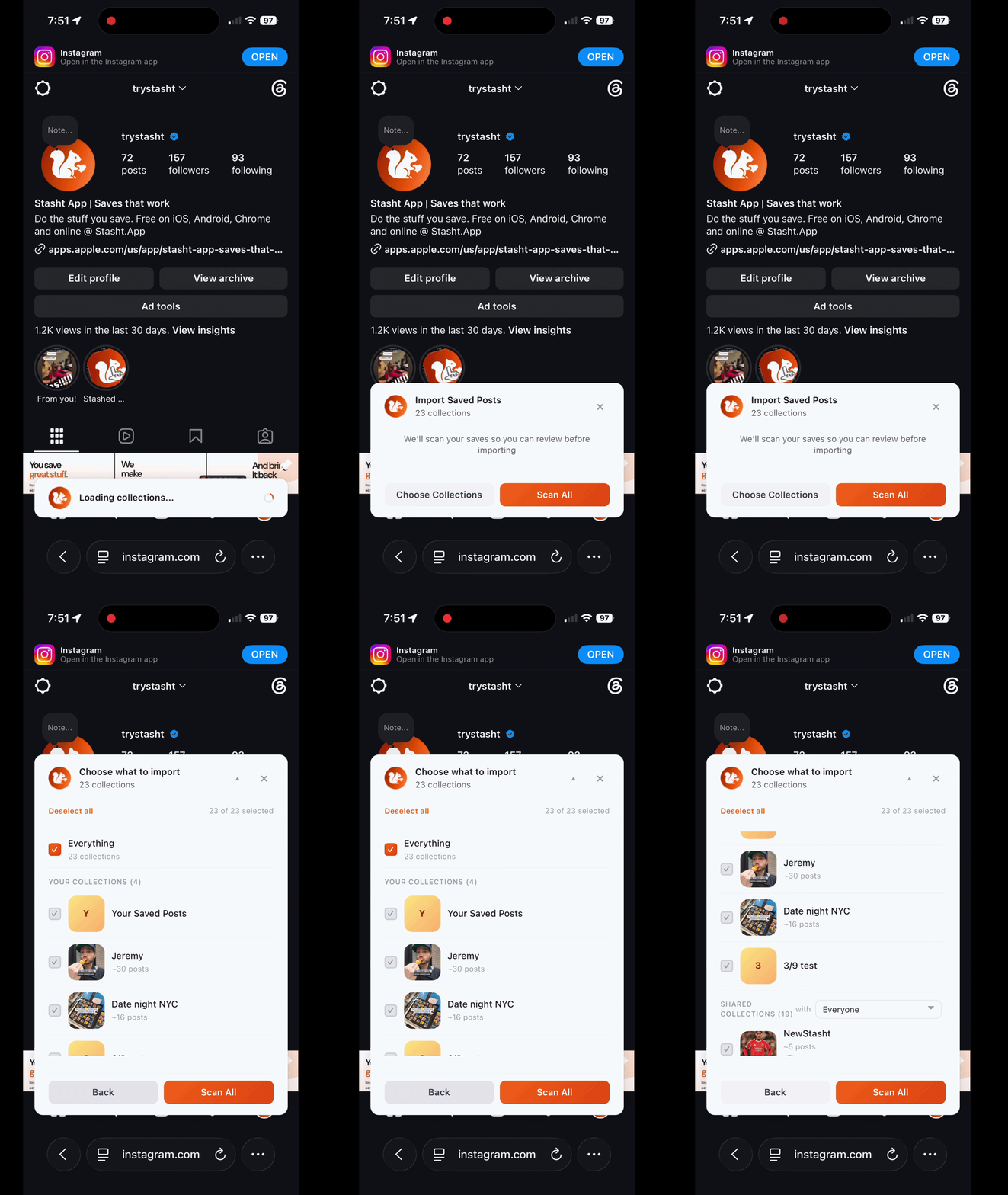
On desktop, Stasht's Chrome extension can bring an existing Instagram collection over in one pass. The Safari extension does the same on Mac, while Stasht on iPhone and iPad includes Safari import there. A big collection comes over together instead of turning into a post-by-post project.
The imported collection stays private until you decide to share it. When you are ready, make it public and send the link. Anyone with that link can open the collection without an Instagram or Stasht account, and you can switch it back to private later, which turns the link off.
A Stasht collection can also hold saves from TikTok, YouTube, and the web. You can search and tag them, identified places can appear together on a map, and imported items keep links to their original posts. Our guide to searching and sorting saved social media posts explains what becomes searchable.
My wife and I keep date-night spots this way. Here is a public version of our date-night collection you can open right now: the places, their details, and the map, all from a normal link.
Common questions
Why is my shared collection not showing up? Usually one of four things: it lives in the chat it was created with rather than where you are looking, you are checking from a computer, the Collaborative toggle was never turned on when it was created, or the app needs an update. A collection that was saved as private is only visible to you.
Can you share a saved collection on Instagram? Yes, but only a new collection that you make collaborative while you create it. You choose a friend or group at that moment, and Instagram ties the collection to that chat. A collection you first saved as private cannot be shared later inside Instagram.
Can you make an existing collection collaborative? No. As of August 2026, Instagram has no control for converting a private collection or adding collaborators after it is created. The native workaround is to build a new collaborative collection and add the old posts to it by hand.
Can you send someone a link to an Instagram collection? No. Collaborative collections stay inside Instagram and are shared through chats. Instagram does not create a public link that opens outside the app.
Where does a collaborative collection show up? In Profile > Saved and in the details of the chat it was shared with. Instagram says collaborative collections are unavailable on computers, so use the mobile app if it does not appear in a browser.
Can someone without Instagram see a collaborative collection? No. Everyone needs Instagram, because the collection lives in an Instagram chat. If you want a link anyone can open, import the collection into something that supports public sharing.
How can you share an existing collection without rebuilding it? Import it with Stasht's Chrome extension on desktop, the Safari extension on Mac, or Safari import in Stasht on iPhone and iPad. In Stasht, the collection can stay private until you make it public and share the link.
Related Stasht guides
- How to search your saved Instagram posts
- How to organize saved Instagram Reels: 5 ways, 2 worth using
- The best ways to save and organize social media posts in one place
- A Lower East Side date night from saved Reels
About Stasht
We built Stasht because we kept saving the same kinds of things this guide is full of: places from Instagram, TikToks worth trying, articles, recipes, events, and links we actually wanted to use later.
Stash something and Stasht pulls out the useful parts: places, dates, links, hours, notes, and context. Then those saves can show up on your map, in your calendar, in search, or in a roundup when they are actually useful.
Use Stasht on iOS, Android, Chrome, or Safari on Mac.