





Short answer: to find saved Reels on Instagram, open Profile > menu > Saved. If you put the Reel in a collection, open that collection. If you did not, check All posts.
How to find saved Reels on Instagram
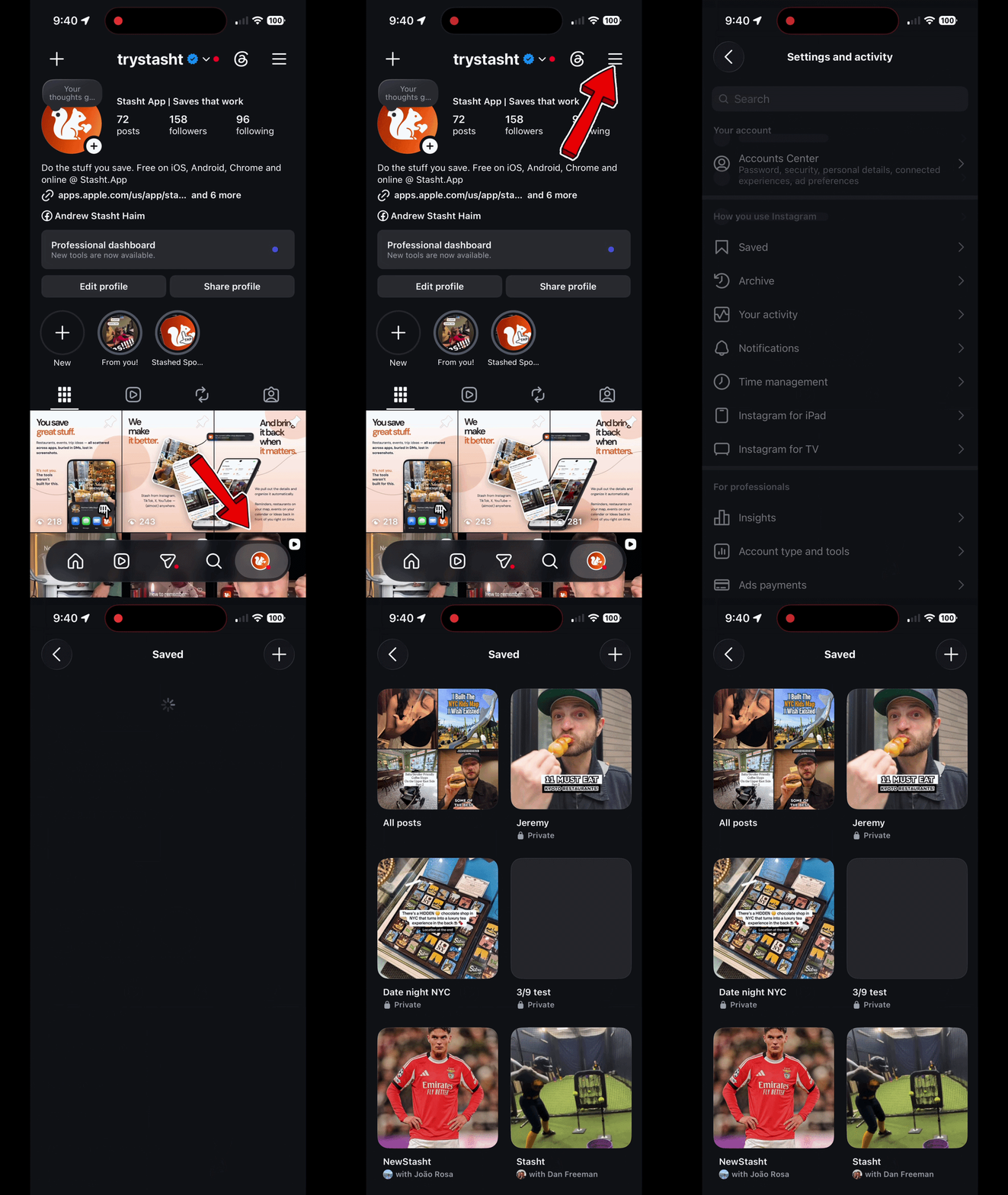
- Open Instagram.
- Tap your profile picture in the bottom-right corner.
- Tap the menu icon in the top-right corner.
- Tap Saved.
- Open All posts or the collection where you filed the Reel.
Found it. What next?
If the Reel you wanted is back in front of you, choose the next step based on what is still getting in your way:
- If the pile is hard to browse, use a better way to organize saved Instagram Reels.
- If you remember a detail but not the post, try these ways to search Instagram saved posts.
- If years of old saves across several apps are the problem, here is how to search and sort them in one place instead of filing them again one by one.
That path works until the one Reel you actually want is not there. Instagram separates saved Reels, liked Reels, downloaded Reels, and collections, and any save can stop working if the original post disappears. Every one of those cases is covered below.
Saved Reels vs. liked Reels
Saved and liked are not the same thing.
- The bookmark icon saves a Reel.
- The heart icon likes a Reel.
- Saved Reels live under Profile > menu > Saved.
- Liked Reels live in your liked-posts area.
If you are sure you saved a Reel but cannot find it, check whether you actually liked it instead. This is common because both actions feel like "keeping" something.
All posts vs. collections
Instagram collections are folders inside Saved. When you long-press the bookmark icon, you can choose a collection like restaurants, recipes, workouts, trip ideas, or gift ideas.
If you skip that step, the Reel still saves. It just goes into All posts with everything else.
Collections are useful for a small number of active topics. They get weaker when you save a lot, because the system depends on you filing every Reel correctly at save time.
As of July 2026, Instagram is promoting collaborative collections again, the shared version of these folders. If you're wondering whether they hold up, here's our review after three years of using one.
Saved Reels vs. downloaded Reels
Saving and downloading are two different actions with two different homes, and mixing them up sends a lot of people to the wrong place.
- Saving (the bookmark icon) keeps the Reel inside Instagram, under Profile > menu > Saved.
- Downloading puts a copy of the video on your phone, outside Instagram. Check your camera roll or gallery app. Downloaded Reels do not appear in Saved.
So if you downloaded a Reel, look in your camera roll or gallery app. If you saved it, look in Saved. Neither place shows the other.
Why saved Reels disappear
If a saved Reel is not where you expect, one of these is usually the reason:
- You are logged into a different Instagram account.
- You liked the Reel instead of saving it.
- You saved it into a collection and are looking in All posts only.
- The creator deleted the Reel.
- The creator made the account private.
- The account that posted it is gone.
- Instagram changed the menu location in your app version.
When the whole Saved area looks emptier than it should, check the account first. A surprising number of "missing" saves are just attached to the account you were using when you tapped the bookmark.
The important thing to know: an Instagram save points at the live post. If the post disappears, the save can stop opening. Instagram has no recovery path for that case, because the thing your save pointed at is gone. This is one reason to keep the saves you actually plan around somewhere with more than a pointer. Stasht keeps the details it pulled out, including the place, the recipe, and your notes, and always links back to the original.
How to see your oldest saved Reels
Your latest saves appear at the top, and there is no way to re-sort them. As of July 2026 the Saved area has no sort or filter controls at all. To reach your oldest saved Reels, open All posts and keep scrolling. The bottom of the grid is the beginning of your save history. The same applies inside a collection.
If the pile is years deep, scrolling is a bad afternoon. This is where importing helps: Stasht can import existing Instagram saves with Chrome on desktop or Safari on Mac, iPhone, and iPad, and once they land you can find any save by place, tag, date, or just a word you remember.
Once you find saved Reels, how do you organize them?
Finding the saved area solves the first problem. The next problem is retrieval: finding the restaurant, recipe, workout, gift idea, or phrase you remember later.
For that, you have a few options. You can use Instagram collections, send Reels to a DM thread, screenshot text-heavy Reels, keep a notes app or spreadsheet, or use a dedicated save app. I ranked those options here: how to organize saved Instagram Reels.
If you want saved Reels to be searchable
Instagram keeps a Reel as a Reel. If what you actually saved was a restaurant, a recipe, an event, a product, or a workout cue, getting from the bookmark to that detail is on you.
That is why we built Stasht. Share a Reel to Stasht and it reads what is written on the post, the text on screen, and what is said in the video. A restaurant can become a place on your map. A recipe can become searchable by ingredient. A workout can be found by the cue you remember.
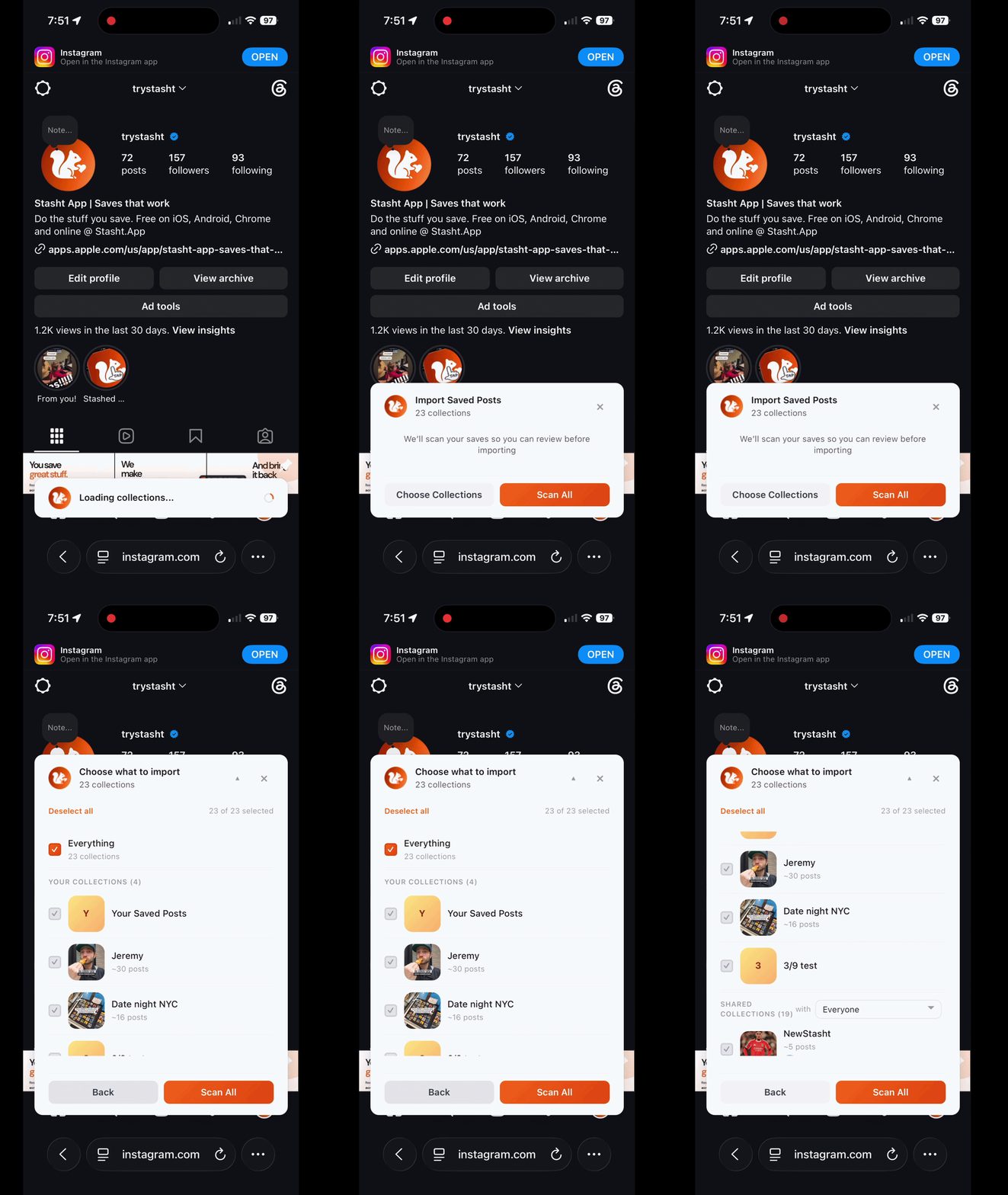
If you already have a pile of old saves, Stasht can import existing Instagram saves with Chrome on desktop or Safari on Mac, iPhone, and iPad. In Safari, log into the supported sites you want to import from, then bring those saves into Stasht. You can also stash pages and posts as you browse.
Common questions
Where do saved Instagram Reels go? They go to the Saved area of your Instagram account. Open Profile > menu > Saved, then check All posts or the collection where you filed the Reel.
Are saved Instagram Reels private? Yes. Instagram's own Saved page states it plainly: "Only you can see what you've saved." Collections can be private or collaborative depending on how you created them.
Why did my saved Reels disappear? Usually the save is fine and something around it changed: you are on a different account, the Reel went into a collection, or you liked it instead of saving it. If the creator deleted the Reel, made the account private, or lost the account, the save points at a post that no longer exists and stops opening. The full checklist is in the "Why saved Reels disappear" section above.
How many Reels can you save on Instagram? Instagram does not publish a limit on how many Reels or posts you can save. In practice the limit that matters shows up much earlier: a few hundred saves in, finding one specific Reel becomes the real problem. That is a retrieval job, covered in how to organize saved Instagram Reels.
Where do downloaded Instagram Reels go? To your phone, and they do not show up in Saved. Downloading puts a copy of the video on your device (check your camera roll or gallery app), while saving keeps the Reel inside Instagram under Profile > menu > Saved.
How do I see my oldest saved Reels? Open All posts and scroll to the bottom of the grid. Your latest saves appear at the top with no way to re-sort them. For a pile that is years deep, importing your saves into something searchable beats scrolling.
How do I search saved Reels on Instagram? Instagram's saved area is built for browsing, and search there is limited. You can narrow by collection, but as of July 2026 there is no search box inside Saved, and no way to look something up by the detail you actually remember, like a dish, a place name, or a phrase from the video. We wrote a full guide on the workarounds: how to search Instagram saved posts.
Can I search saved Reels by words spoken in the video? Not well inside Instagram. If you need to search by spoken words, on-screen text, ingredients, place names, or notes, use a system that reads the video content, like Stasht.
Can I export or import my saved Instagram Reels? Instagram does not make this as simple as a normal export button in Saved. Stasht can import existing Instagram saves with Chrome on desktop or Safari on Mac, iPhone, and iPad, then organize them as they land.
What should I read next? If you found the Saved area but still cannot use the pile, read how to organize saved Instagram Reels. If you save TikToks too, read how to find your saved TikToks.
Related Stasht guides
- How to organize saved Instagram Reels
- How to search Instagram saved posts
- How to find your saved TikToks
- How to search and sort saved social media posts
- The best ways to save and organize social media posts in one place
About Stasht
We built Stasht because we kept saving the same kinds of things this guide is full of: places from Instagram, TikToks worth trying, articles, recipes, events, and links we actually wanted to use later.
Stash something and Stasht pulls out the useful parts: places, dates, links, hours, notes, and context. Then those saves can show up on your map, in your calendar, in search, or in a roundup when they are actually useful.