 Stasht
Import your saves. Don't start from zero.
You've saved great stuff on Instagram and TikTok. Bring Instagram Saved posts and favorites in the TikTok collections you choose into Stasht from your browser, and we'll bring them back when it matters.


Free on iOS, Android, and desktop.
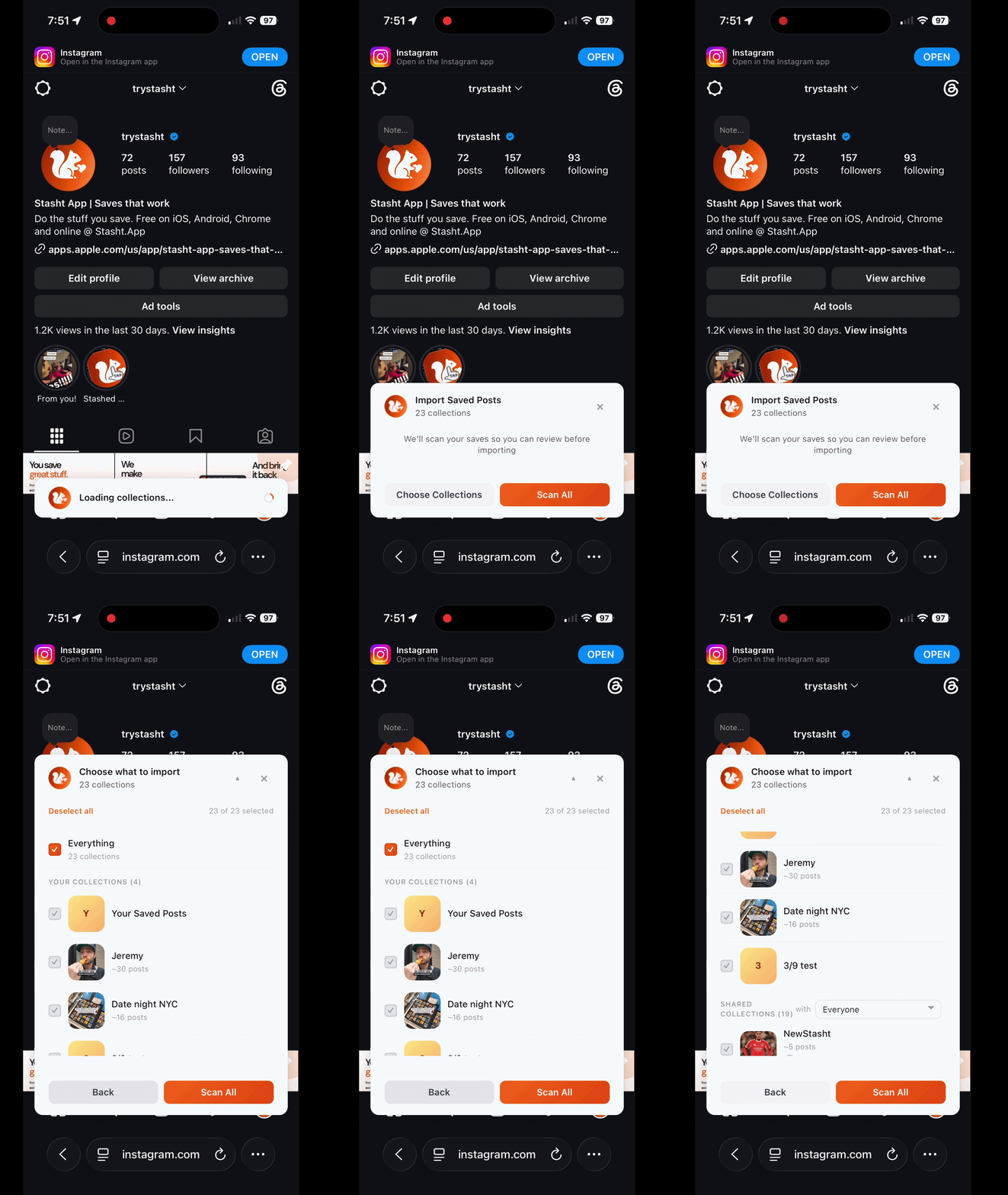
Watch your saves move in
Open Instagram in Safari while you're signed in, and the Stasht extension pulls your saved posts straight into your stash. On a computer, the same import runs from Chrome or Safari on Mac.
Your saves live in a lot of places
You've got great taste and a long history of saves to prove it. Restaurants, trips, recipes, workouts. Instagram keeps its saves on Instagram, TikTok keeps its Favorites on TikTok, and nobody should have to re-share years of finds one post at a time.
It's not your fault. The tools just weren't built to do anything with what you saved. Both platforms can export your data, but you get a file of raw links. No map pins, and nothing searchable inside the videos.
Import from the browser you already use
On desktop, the Chrome extension imports Instagram, TikTok, Reddit, X, YouTube, and Pinterest. Safari on Mac covers all of those except YouTube. On iPhone and iPad, Safari imports Instagram, TikTok, Reddit, and X.
Pick what comes over
Sign in to Instagram or TikTok in your own browser tab. Stasht never asks for your password. Choose the collections you want, skip the rest, and if the import gets interrupted, it picks up where it left off.
Every detail, pulled out
Once your saves land, we get to work. Identified places can appear on your map, dated events on your calendar, and captions, transcripts, and on-screen text become searchable. Results depend on what's in each post.
Free, with no import cap
The extensions and bulk import are free, and there's no weekly limit on how much you bring over. Collections stay grouped or get tagged by where they came from, so Instagram Saved and TikTok collections don't blur together.
Old saves, new life
That coffee spot from two summers ago shows up on your map when you're nearby. That TikTok list of things to do is ready to pull up when a friend asks for ideas. Here's how two real public saves look in Stasht.

The Clock Coffee In Midtown
A Midtown coffee spot saved from Instagram, organized with its location and a link back to the original post.

Explore Unique Activities in Atlanta This Summer
A TikTok roundup of summer things to do in Atlanta, with the places pulled out and the source video one tap away.
How it works
Add the extension
Install Stasht for Chrome or Safari on your computer, or turn on the Safari extension that comes with Stasht on iPhone and iPad.
Pick your collections
Open Instagram or TikTok while you're signed in, review your saves, and choose what to import.
Your saves find you
Everything gets organized the moment it lands, with a link back to every original post. We'll bring it back when it matters.
Frequently Asked Questions
Can I import my Instagram saved posts and collections?
Can I import TikTok Favorites?
Does Stasht need my Instagram or TikTok password?
What about Reddit, X, YouTube, and Pinterest?
What happens to posts that were deleted or made private?
Is Stasht free?
Keep reading
Get Stasht
Free on iOS, Android, and desktop.